

A vintage postage stamp is a tiny engraved window onto a distant harbor, a mountain railway or a long-gone airmail route. It’s always been the challenge for the collector and the travel storyteller to share that wonder beyond a flat scan.
Now, thanks to Dreamina’s AI video generator, the one stamp can become a brief travel tale, revealing the smoke rising from a locomotive, the waves rolling into a port and the thumping of a postmark at the end of the trip.
This guide describes how you can do that in Dreamina, starting from preparing the scan to exporting your video.
The history of stamps is a mini-travelogue.
Stamps were no mere postage receipts. Governments utilised them to feature landmarks, wildlife, trains, ships and national pride, and engravers manufactured landscapes in a few square centimetres. There is already a story within each design; what happened to it, who sent it, what the artist wanted the world to see.
That story has a pulse with animation. Rather than squinting at fine lines, viewers can watch the scene come alive, catching everyone scrolling by.
Meet Seedance 2.5: features that bring engravings to life.
Dreamina’s video is made using a controlled, cinematic model called Seedance 2.5. These features benefit stamp stories the most:
- Reference image fidelity: your stamp’s composition, colour range and details remain recognisable.
- The movement of water, smoke, clouds and fabric is smooth and natural.
- Plain language camera controls: ask for a push-in, a pan across the scene, or a pull-back reveal.
- Consistency in style: the vintage print style can be maintained throughout the entire clip.
- Multiple video lengths and aspect ratios: create a short loop or longer story for any platform.
- Audio support: Comp a soundtrack to fit the style and era.
Before you make your stamp or photo:
It really begins with a clean reference, a great video. Take a high-resolution scan of the stamp, or take a picture on the flat plate under a soft, even light so that there isn’t any glare on the glossy paper. If you prefer the collectible look, leave the perforated edges exposed, but if you wish to frame the animation tightly around the engraving, you can crop the edges out of the image. Do not have any shadows in the picture, and straighten the stamp to be square to the camera. If your stamp fades, don’t worry. The muted colors can lend a gorgeous heritage feel to the final video.
Step by Step: Make your stamp travel!
Step 1: Upload a reference image and type in the corresponding prompt.
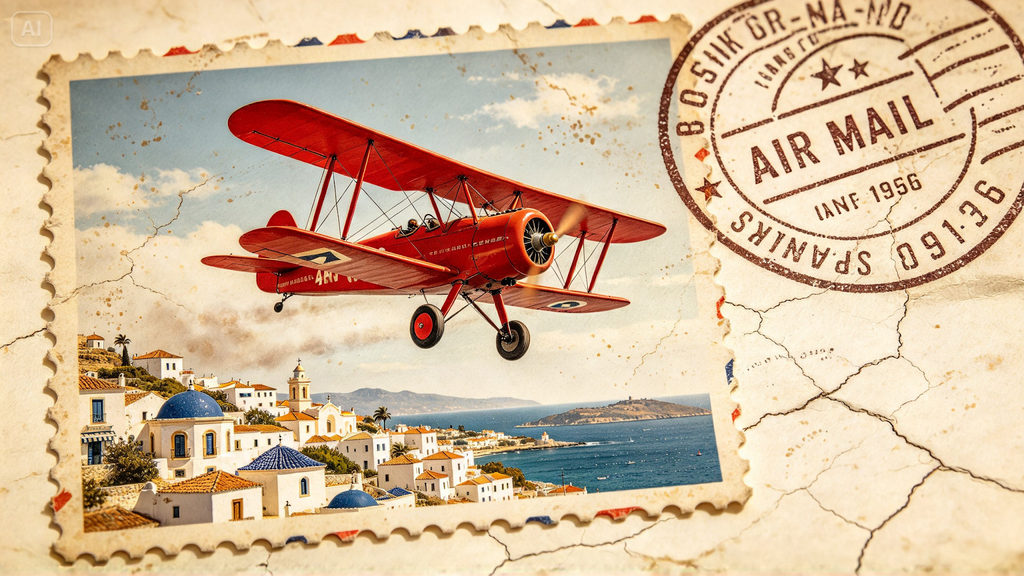
Log in to Dreamina and go to the “AI Video” section. To upload your stamp image and write your prompt to describe your video, click on “Add reference image”. Look at the picture and identify details to refer to: the biplane, the coastal town, the engraved line texture and the greyish cream and red colour scheme.
30-second sample prompt: Based on the uploaded stamp, maintain all of the quality of the engraving, the red biplane, the coastal town, and the vintage, cream and red palette. Gradually bring the scene to life: The biplane floats slowly over the sky, the waves slowly approach the shore, and the clouds gradually drift by, gradually entering the engraving until the entire town is visible and withdraw to reveal a circular postmark stamping on the corner. Warm nostalgic strings, subtle propeller noise, warm film lighting.
Step 2: Making your video
Select the Seedance 2.5 model for the generation, add your image and prompt. Next, choose the duration of the video and a suitable video aspect ratio (V0 for YouTube and V1 for TikTok). Lastly, click on Dreamina’s icon and wait for a few seconds for it to process.
Step 3: Improve & save the video
Before saving the video with Dreamina’s AI editing features, make sure to polish it up. If you’re looking for more detail, use the advanced options like Upscale, and add sound with Generate soundtrack. Lastly, publish and post your video on different social media sites.
Stamps on the story structures
Use one of these techniques to provide a storyline for your animation:
- Use the departure (the scene that awakens as a traveller is leaving), ending with the postmark.
- The arrival: the camera zooms into the scene as the destination becomes visible.
- The journey of the letter: the stamp goes from a desk to a mail sack, a ship and a train.
- Day time-lapse (sunrise to sunset of engraved terrain).
- The collector’s reveal: collector turns page of album, stamp lives under magnifier.
Encouraging engraving and perforated edges
Your prompt should respect the visual code of stamp. Say, “fine engraved lines,” “limited vintage ink palette,” and “slightly faded paper grain. To add the hatching and line work to the final texture, include the option “keep the hatching and line work visible. If you want to keep the edges, say so as “perforated border. Do not ask for too many simultaneous motions: one or two moving elements (ship and sea) will appear more sophisticated than multiple actions all moving.
Adding postmarks, music and background sounds
Sound makes the story come alive. Before the music starts, a ship horn in the distance, the chugging of a steam engine, or the soft scratch of a pen on paper sets the ambience a sound of a ship horn in the distance, the chugging of a steam engine or a soft scratch of a pen on paper that sets up the ambiance. For example, Dreamina’s soundtrack tool can create ambient music like a soft accordion or string gently playing, or a vintage jazz trio. A final “thunk” ending provides a satisfying beat and lets the shot play out to the end.
Final thoughts
Every stamp carries a journey, and image to video tools let you finally show it. Scan a favorite design, write a prompt that protects its engraved charm, and let Dreamina and Seedance 2.5 send your stamp traveling across the screen.